
Baidu recently released a new OCR model called Unlimited-OCR. Unlike traditional OCR models that process documents page by page, this model employs "one-shot long-horizon parsing," enabling it to parse dozens of pages in a single pass. This approach eliminates the need to repeatedly reset the model's memory — a requirement of page-by-page processing — thereby better preserving contextual information across pages. Consequently, OCR has evolved from a tool for recognizing individual pages into a system capable of understanding and parsing long documents.
Unlimited-OCR Features
- Full-document parsing instead of cropped-region OCR
- 32K output length for long OCR sequences
- Based on DeepSeek-OCR, inheriting the high-compression visual encoding capabilities of DeepEncoder.
- Utilizing the R-SWA attention mechanism makes long-sequence decoding more stable and efficient.
Unlimited-OCR Architecture
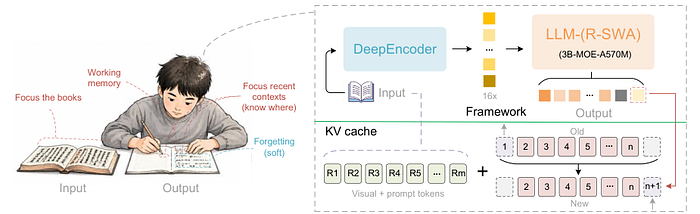
Unlimited-OCR employs DeepSeek OCR as its baseline model. Unlike the original DeepSeek OCR, it replaces the standard multi-head attention mechanism with a novel attention mechanism known as R-SWA.
Local Deployment
The official Unlimited-OCR documentation provides detailed instructions on deploying Unlimited-OCR using Transformers, vLLM, or SGLang; here, I will explain how to deploy it locally on macOS using mlx-vlm.
- Configure the virtual environment
uv venv .venv
source .venv/bin/activate
2. Install mlx-vlm
uv pip install "git+https://github.com/Blaizzy/mlx-vlm" --prerelease=allow3. Download the model
Download the Unlimited-OCR model using the hf CLI tool provided by Hugging Face.
hf download baidu/Unlimited-OCR --local-dir ./models/Unlimited-OCR4. Run the Unlimited-OCR model.
4.1 Single-image document parsing
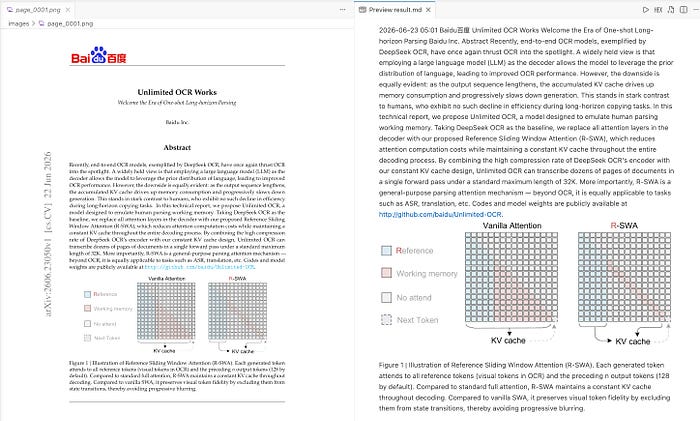
When you only need to parse a single image, you need to set the value of the prompt parameter in the apply_chat_template function to "document parsing."
from pathlib import Path

from ocr_result_parser import parse_single_result, save_parsed_result


IMAGE_PATH = Path("images/page_0001.png")
OUTPUT_DIR = Path("output/single_image")
MODEL_PATH = "models/Unlimited-OCR"


def main():
    from mlx_vlm import generate, load
    from mlx_vlm.prompt_utils import apply_chat_template

    model, processor = load(MODEL_PATH)

    prompt = apply_chat_template(
        processor,
        model.config,
        "document parsing.",
        num_images=1,
    )

    result = generate(
        model=model,
        processor=processor,
        image=str(IMAGE_PATH),
        prompt=prompt,
        max_tokens=32768,
        temperature=0.0,
    )

    parsed = parse_single_result(
        result.text,
        image_path=IMAGE_PATH,
        output_dir=OUTPUT_DIR,
    )
    save_parsed_result(result.text, parsed, OUTPUT_DIR)
    print(parsed["markdown"])


if __name__ == "__main__":
    main()
In the code above, the ocr_result_parser script is used to parse the model's output; the code for this script is as follows:
import ast
import json
import re
from pathlib import Path
try:
from PIL import Image, ImageOps
except ImportError:
Image = None
ImageOps = None
DET_OPEN = "<|det|>"
DET_CLOSE = "<|/det|>"
REF_OPEN = "<|ref|>"
REF_CLOSE = "<|/ref|>"
PAGE_MARKER = "<PAGE>"
SPECIAL_TOKENS = (
"<|begin▁of▁sentence|>",
"<|end▁of▁sentence|>",
"<|▁pad▁|>",
)
def strip_special_tokens(text):
for token in SPECIAL_TOKENS:
text = text.replace(token, "")
return text.strip()
def find_balanced_brackets(text, start):
if start >= len(text) or text[start] != "[":
return None
depth = 0
for index in range(start, len(text)):
char = text[index]
if char == "[":
depth += 1
elif char == "]":
depth -= 1
if depth == 0:
return index + 1
return None
def parse_boxes(raw_boxes):
value = ast.literal_eval(raw_boxes)
if value and all(isinstance(item, (int, float)) for item in value):
value = [value]
boxes = []
for box in value:
if (
isinstance(box, (list, tuple))
and len(box) == 4
and all(isinstance(item, (int, float)) for item in box)
):
boxes.append([float(item) for item in box])
return boxes
def detection_spans(text):
spans = []
position = 0
label_pattern = re.compile(r"[A-Za-z_][\w-]*")
while True:
det_start = text.find(DET_OPEN, position)
if det_start == -1:
break
cursor = det_start + len(DET_OPEN)
while cursor < len(text) and text[cursor].isspace():
cursor += 1
label_match = label_pattern.match(text, cursor)
if not label_match:
position = cursor
continue
label = label_match.group(0)
cursor = label_match.end()
while cursor < len(text) and text[cursor].isspace():
cursor += 1
box_end = find_balanced_brackets(text, cursor)
if box_end is None:
position = cursor
continue
close_start = box_end
while close_start < len(text) and text[close_start].isspace():
close_start += 1
if not text.startswith(DET_CLOSE, close_start):
position = close_start
continue
span_start = det_start
ref_text = None
if text[:det_start].endswith(REF_CLOSE):
ref_start = text.rfind(REF_OPEN, 0, det_start)
ref_close_start = text.rfind(REF_CLOSE, 0, det_start)
if ref_start != -1 and ref_close_start != -1:
ref_close_end = ref_close_start + len(REF_CLOSE)
if ref_close_end == det_start:
span_start = ref_start
ref_text = text[ref_start + len(REF_OPEN):ref_close_start]
span_end = close_start + len(DET_CLOSE)
raw_boxes = text[cursor:box_end]
try:
boxes = parse_boxes(raw_boxes)
except (SyntaxError, TypeError, ValueError):
boxes = []
spans.append(
{
"span": [span_start, span_end],
"raw": text[span_start:span_end],
"label": label,
"boxes": boxes,
"ref": ref_text.strip() if ref_text else None,
}
)
position = span_end
return spans
def normalized_box_to_pixels(box, image_size):
width, height = image_size
x1, y1, x2, y2 = box
left = int(max(0, min(width, x1 / 999 * width)))
top = int(max(0, min(height, y1 / 999 * height)))
right = int(max(0, min(width, x2 / 999 * width)))
bottom = int(max(0, min(height, y2 / 999 * height)))
return left, top, right, bottom
def load_source_image(image_path):
if Image is None or ImageOps is None or image_path is None:
return None
image_path = Path(image_path)
if not image_path.exists():
return None
return ImageOps.exif_transpose(Image.open(image_path))
def save_image_crop(source_image, box, output_path):
left, top, right, bottom = normalized_box_to_pixels(box, source_image.size)
if right <= left or bottom <= top:
return False
output_path.parent.mkdir(parents=True, exist_ok=True)
source_image.crop((left, top, right, bottom)).save(output_path)
return True
def is_image_detection(item):
return item["label"] == "image" or item["ref"] == "image"
def parse_page_result(raw_text, image_path=None, output_dir=None, image_prefix=""):
text = strip_special_tokens(raw_text)
spans = detection_spans(text)
source_image = load_source_image(image_path)
output_dir = Path(output_dir) if output_dir is not None else None
markdown_parts = []
cursor = 0
image_index = 0
for item in spans:
span_start, span_end = item["span"]
markdown_parts.append(text[cursor:span_start])
if is_image_detection(item) and item["boxes"] and source_image is not None and output_dir is not None:
image_name = f"{image_prefix}{image_index}.jpg"
image_output = output_dir / "images" / image_name
if save_image_crop(source_image, item["boxes"][0], image_output):
item["image"] = f"images/{image_name}"
markdown_parts.append(f"\n")
image_index += 1
cursor = span_end
markdown_parts.append(text[cursor:])
markdown = "".join(markdown_parts)
markdown = markdown.replace("\\coloneqq", ":=").replace(
"\\eqqcolon", "=:").strip()
return {
"markdown": markdown,
"detections": spans,
}
def split_page_segments(text):
if PAGE_MARKER not in text:
return [text]
parts = text.split(PAGE_MARKER)
if not parts[0].strip():
return parts[1:]
return parts
def parse_single_result(raw_text, image_path=None, output_dir=None):
return parse_page_result(raw_text, image_path=image_path, output_dir=output_dir)
def parse_multi_page_result(raw_text, image_paths=None, output_dir=None):
text = strip_special_tokens(raw_text)
image_paths = [Path(path) for path in image_paths or []]
output_dir = Path(output_dir) if output_dir is not None else None
pages = []
markdown_pages = []
for page_index, page_text in enumerate(split_page_segments(text)):
image_path = image_paths[page_index] if page_index < len(
image_paths) else None
parsed_page = parse_page_result(
page_text,
image_path=image_path,
output_dir=output_dir,
image_prefix=f"page_{page_index + 1:04d}_",
)
parsed_page["page_number"] = page_index + 1
parsed_page["image_path"] = str(
image_path) if image_path is not None else None
for item in parsed_page["detections"]:
item["page_number"] = page_index + 1
pages.append(parsed_page)
markdown_pages.append(parsed_page["markdown"])
markdown = f"{PAGE_MARKER}\n" + f"\n{PAGE_MARKER}\n".join(markdown_pages)
return {
"markdown": markdown.strip(),
"pages": pages,
}
def save_parsed_result(raw_text, parsed, output_dir):
output_dir = Path(output_dir)
output_dir.mkdir(parents=True, exist_ok=True)
(output_dir / "raw.txt").write_text(raw_text, encoding="utf-8")
(output_dir / "result.md").write_text(parsed["markdown"], encoding="utf-8")
(output_dir / "result.json").write_text(
json.dumps(parsed, ensure_ascii=False, indent=2),
encoding="utf-8",
)Input Image
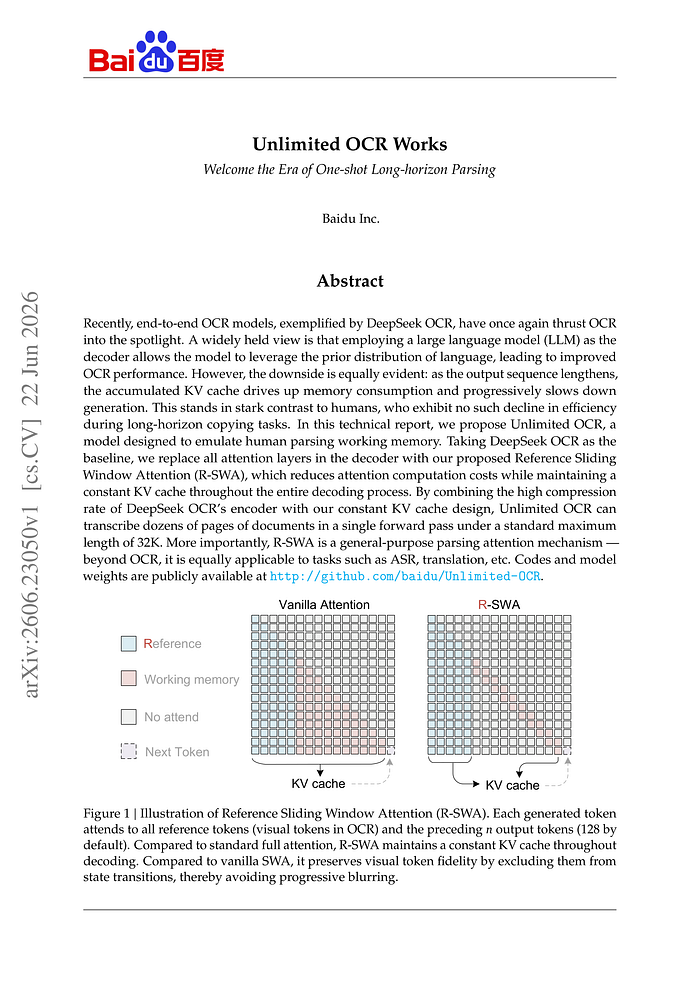
Result:
4.2 Multi-page parsing
When you need to parse multiple images, you must set the value of the prompt parameter in the apply_chat_template function to "Multi page parsing."
import argparse
from pathlib import Path

from ocr_result_parser import parse_multi_page_result, save_parsed_result


MODEL_PATH = "models/Unlimited-OCR"
OUTPUT_DIR = Path("output/multi_page")
DEFAULT_IMAGE_PATTERNS = (
    "images/page_*.png",
    "page_*.png",
)


def parse_args():
    parser = argparse.ArgumentParser(
        description="Run Unlimited-OCR multi-page parsing on rendered PDF page images."
    )
    parser.add_argument(
        "images",
        nargs="*",
        type=Path,
        help="Page images in reading order. If omitted, images/page_*.png is used.",
    )
    parser.add_argument(
        "-o",
        "--output-dir",
        type=Path,
        default=OUTPUT_DIR,
        help="Directory for raw.txt, result.md, result.json, and cropped images.",
    )
    parser.add_argument(
        "--max-tokens",
        type=int,
        default=32768,
        help="Maximum generated tokens.",
    )
    return parser.parse_args()


def resolve_page_images(images):
    if images:
        page_images = [path.expanduser().resolve() for path in images]
    else:
        page_images = []
        for pattern in DEFAULT_IMAGE_PATTERNS:
            page_images = sorted(Path().glob(pattern))
            if page_images:
                break
        page_images = [path.resolve() for path in page_images]

    missing = [path for path in page_images if not path.is_file()]
    if missing:
        names = ", ".join(str(path) for path in missing[:5])
        suffix = " ..." if len(missing) > 5 else ""
        raise FileNotFoundError(f"Page image(s) not found: {names}{suffix}")
    if not page_images:
        patterns = ", ".join(DEFAULT_IMAGE_PATTERNS)
        raise FileNotFoundError(f"No page images found. Pass images explicitly or create files matching: {patterns}")
    return page_images


def main():
    args = parse_args()
    page_images = resolve_page_images(args.images)

    from mlx_vlm import generate, load
    from mlx_vlm.prompt_utils import apply_chat_template

    model, processor = load(MODEL_PATH)

    prompt = apply_chat_template(
        processor,
        model.config,
        "Multi page parsing.",
        num_images=len(page_images),
    )

    result = generate(
        model=model,
        processor=processor,
        image=[str(path) for path in page_images],
        prompt=prompt,
        max_tokens=args.max_tokens,
        temperature=0.0,
        cropping=False,
        image_size=1024,
    )

    parsed = parse_multi_page_result(
        result.text,
        image_paths=page_images,
        output_dir=args.output_dir,
    )
    save_parsed_result(result.text, parsed, args.output_dir)
    print(parsed["markdown"])


if __name__ == "__main__":
    main()
In most PDF parsing scenarios, you can use the following script to convert a PDF document into ordered page images.
from pathlib import Path

import pymupdf

pdf_path = Path("2606.23050v1.pdf")
out_dir = Path("images")
out_dir.mkdir(exist_ok=True)

# Upstream examples use 300 DPI. Lower this if you need a quicker smoke test.
dpi = 300
matrix = pymupdf.Matrix(dpi / 72, dpi / 72)

with pymupdf.open(pdf_path) as doc:
    for i, page in enumerate(doc):
        page.get_pixmap(matrix=matrix, alpha=False).save(
            out_dir / f"page_{i + 1:04d}.png")
Summary
Unlimited-OCR redefines how long documents are parsed. By processing dozens of pages in a single pass, it avoids page-by-page handling, reduces fragmentation, preserves context, and improves the efficiency of long-document processing.
If you need to parse long documents, you might want to try the Unlimited-OCR model. Should it fail to meet your requirements, you can also test the PaddleOCR-VL-1.6 and MinerU2.5-Pro models.