


Not a 2B toy model: a 35-billion-parameter AI now fits entirely inside the memory of the cheapest Mac Apple sells. Free, private, works offline, one copy-paste command. Real speed numbers from a real mini inside — and how it's even possible.
TL;DR — With one copy-paste command, a stock 16 GB M4 Mac mini can run Qwen3.6–35B — a 35-billion-parameter open AI model, the class of model that normally needs a workstation — entirely on-device. It answers at about 10 words per second (10 tokens/second), works with the internet off, is completely free, and nothing you type ever leaves your Mac. No settings to change, no administrator password, no external drive. The trick is a new compression format that squeezes the model from 70 GB down to 9.4 GB, small enough to sit fully in the mini's memory. Real numbers from my own mini below — plus where this technique stops working, because it's not magic.
Every "big AI on a small Mac" story I've written so far has had the model streams from the hard drive, which means slow cold starts and fiddly settings. This time there's no stream from the hard drive. The model just… fits.
What you need
- Any Apple Silicon Mac (M1 or newer) with 16 GB of memory— the base M4 Mac mini qualifies, and that's the exact machine I tested on.
- About 10 GB of free disk space for the model download.
- Python 3.10 or newer. Check with `python3 — version or python — version` in Terminal; if you don't have it, `brew install python` (or grab it from python.org) takes two minutes.
- Ten minutes, most of it download time.
That's it. Nothing else to install, no account to create, no API key.
Try it (two commands)
Open Terminal (press ⌘-Space, type "Terminal") and paste:
python3 -m pip install "turboquant-mlx-full>=0.12.3" mlx-lmThat installs the free, open-source engine ([TurboQuant-MLX]( https://github.com/manjunathshiva/turboquant-mlx ), built on Apple's own MLX framework). Then:
python3 -m turboquant_mlx.generate \
 --model manjunathshiva/Qwen3.6-35B-A3B-tq3a-tqTe-g64 \
 --prompt "Explain why the sky is blue." --max-tokens 4096
The first run downloads the 9.4 GB model (one-time); after that it loads from disk in seconds and works fully offline. Swap the prompt for anything you like — questions, writing help, code, summaries.
Here's what I measured, running it for real:
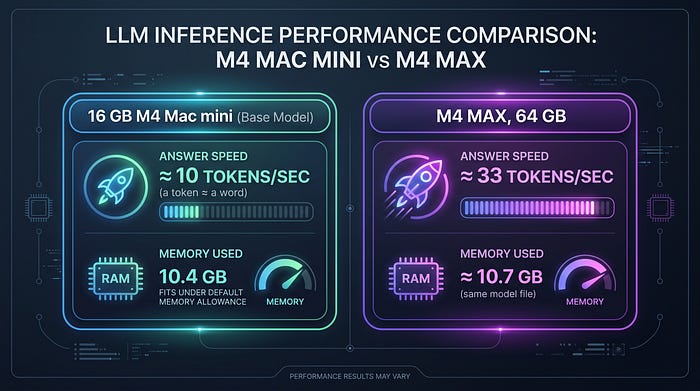
Ten words a second is roughly the speed you read at — the answer scrolls by like someone typing very fast. And note the memory column: the entire model lives in the mini's unified memory (engineers call this "fully resident"). Nothing pages in from the hard drive while it works, which is why it feels immediate.
One genuinely surprising detail: memory use didn't grow with longer answers. Whether it wrote 500 or 1,800 words, the peak was an identical 10.42 GB. This particular model has an unusual architecture where most of its layers keep a fixed-size "memory" regardless of conversation length — so long chats don't slowly eat your RAM the way they do with most local AI models. (For very long documents — 10,000+ words — or an always-on setup, there's one optional system tweak; see the caveats.)
How does a 35-billion-parameter model fit in 16 GB?
This is the geeky part — skip ahead if you just want to use it.
Uncompressed, this model is about 70 GB — it wouldn't fit in a 16 GB Mac by a mile. Two things close the gap:
First, the model is a "Mixture of Experts." Instead of one giant brain, it's built from 256 small specialists, and for every word it generates, a router picks just 8 of them to consult. So while there are 35 billion parameters in total, only about 3 billion do work at any moment — that's why it's fast on modest hardware.
Second — and this is the new part — those 256 experts are compressed to 1.58 bits per weight. Every number inside the experts is stored as just one of three values (−c, 0, or +c). Three values is log₂ 3 ≈ 1.58 bits of information, and the format packs them in base-3–20 of these "trits" per 32-bit word. For comparison, most "compressed" local models use 4 bits per weight; this is well under half that. The result: 70 GB → 9.4 GB, and the compression needs no training data and took 29 seconds on my Mac 64GB M4 Max.
The parts of the model that can't tolerate rough treatment — the attention layers everything flows through, and the router that picks experts — stay at higher precision. That balance is the whole trick.
Where it stops working (I checked)
Three-values-per-number sounds like it shouldn't work at all, and honestly, it only works when a model has enough redundancy to absorb the damage. I converted models on both sides of the line to find it:
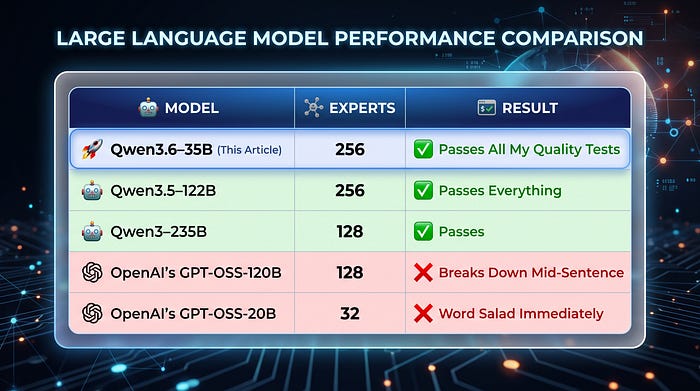
The interesting failure is GPT-OSS-120B: it has plenty of experts, but it consults only 4 per word (less averaging to hide errors) and its published weights are already compressed to 4 bits — compressing a compression compounds the error. So the rule: this works on models with many experts, generous routing, and full-precision originals. The 35B in this article maxes out all three, which is why the smallest model in the lineup is also the most bulletproof.
Quality-wise, the 9.4 GB build passes my standard six-test gauntlet — a 1,500-word essay, multi-step math, working code with tests, finding a planted password in a long document, strict formatting, and a repetition trap. It's not indistinguishable from the uncompressed model, but it's good, and it's running on a $599 computer.
Got a bigger Mac? The same trick scales up
I ran the identical recipe on bigger models. One command, three sizes:
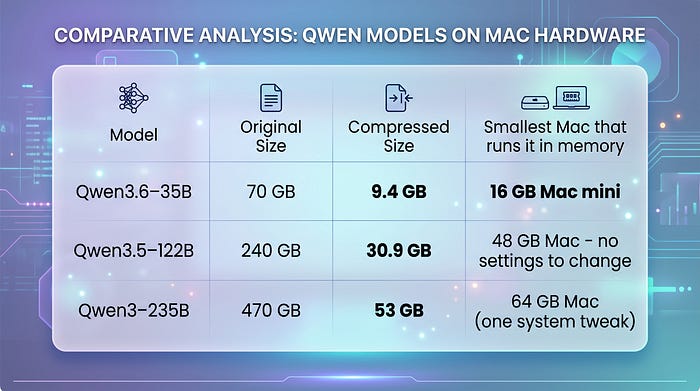
The 122B case is worth a sentence: its regular 3-bit compressed version is 54 GB — it barely runs on a 64 GB Mac, needs an administrator command, and crashes on long documents. The 1.58-bit version loads on a stock 64 GB Mac with no settings at all and leaves ~25 GB free. The trade is speed — about 13 words/sec instead of 25, since unpacking base-3 numbers costs the GPU more arithmetic. Half the footprint for half the speed; what the footprint buys is Macs and conversation lengths the bigger build can't touch at all.
One quirk to know: this model "thinks out loud"
Qwen3.6–35B is a thinking model — before answering, it writes out private reasoning (you'll see it labeled as a thinking section), then gives the actual answer. At this extreme compression level, the thinking phase is the fragile part, and I hit two quirks during testing: occasionally it would ramble in circles while thinking, and once in a while it printed its final answer twice.
Both are fixed in the current version of the engine (that's why the install command says `>=0.12.3`) — the fixes apply automatically, no flags to remember. Two tips that make it nicer to use:
- Want quick answers, or doing math or anything with strict formatting? Add ` — no-think` to the command. Answers arrive in seconds instead of minutes, and in my testing, it actually got math problems right that the thinking mode wandered away from.
- Want to watch it reason? Just run it as-is. The defaults handle the rest.
I mention this because every heavily compressed thinking model will have some version of these quirks — "here's the failure and here's the fix" beats pretending it's flawless.
Advanced: use it with chat apps and coding tools
If you'd rather have this behind a chat interface — or wire it into coding tools like Aider or Cursor-style setups — the same model runs as a local server that speaks the standard OpenAI API:
python3 -m pip install "turboquant-mlx-full[serve]>=0.12.3"

turboquant-serve --model manjunathshiva/Qwen3.6–35B-A3B-tq3a-tqTe-g64 --kv-bits 8
Any app that can point at a custom OpenAI-compatible endpoint (`http://localhost:8080`) can now use your mini as its AI backend. Because the model is fully in memory, it handles the big prompts these tools send at full speed.
Honest caveats
- ~10 words/sec is comfortable-reading speed, not instant. Smaller models are snappier; this is for when you want big-model quality on a 16 GB machine.
- Thinking mode takes its time — at 10 words/sec, watching it deliberate takes minutes. Use ` — no-think` when you just want the answer.
- Math is the weakest spot of the extreme compression — use ` — no-think` for arithmetic, or a less-compressed model when exactness matters most.
- Close memory-hungry apps while it runs. The model fits the mini's default GPU memory allowance with only ~80 MB to spare. For very long documents or an always-on server, one optional Terminal command raises the allowance until the next reboot:
sudo sysctl -w iogpu.wired_limit_mb=14336normal use never needs it.
- First download is 9.4 GB — do it on decent Wi-Fi.
Links
- 🤗 [The model itself, free on Hugging Face] https://huggingface.co/manjunathshiva/Qwen3.6-35B-A3B-tq3a-tqTe-g64
- 🤗 Bigger Macs: [the 122B version] https://huggingface.co/manjunathshiva/Qwen3.5-122B-A10B-tq3a-tqTe-g64
- 📖 [The deep technical write-up of the 1.58-bit format][part6]
- 📦 [turboquant-mlx-full on PyPI] https://pypi.org/project/turboquant-mlx-full
- ⚙️ [Source code on GitHub] https://github.com/manjunathshiva/turboquant-mlx
[part6]:
A postscript on how far this has come: a few months ago, running this very model on this very mini meant streaming it from the hard drive — special flags, cache tuning, and a table of settings to get the same 10 words per second ([the old version's page]( https://huggingface.co/manjunathshiva/Qwen3.6-35B-A3B-tq3-g32 ) documents that whole era). The new format retires all of it: same model, same machine, no hard drive in the loop.
A 35-billion-parameter AI used to mean a GPU server. Then it meant an expensive Mac. Then it meant clever disk-streaming tricks. As of this week it means the cheapest Mac Apple sells, running it the boring way — entirely in memory.
*AI disclosure: the software, experiments, and measurements in this article are my own work, run on my own machines; I used Claude (Anthropic) to help draft and edit the prose.
Support
If you found this article informative and valuable, I'd greatly appreciate your support:
"Give it a few claps 👏 on Medium to help others discover this content (did you know you can clap up to 50 times?). Your claps will help spread the knowledge to more readers."
- Share it with your network of AI enthusiasts and professionals.
- Subscribe to my YouTube channel for AI videos explained in simple English: https://www.youtube.com/@AIBroEnglish
- Connect with me on LinkedIn: https://www.linkedin.com/in/manjunath-janardhan-54a5537/