

Not a medium member? Read the full article here.
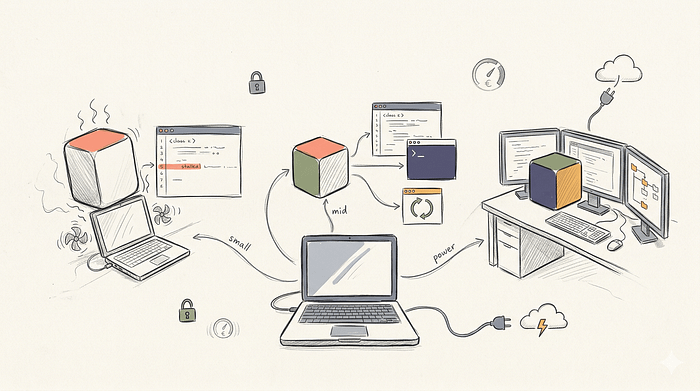
We've all gone through the process of trying to run a multi-billion parameter model on our local machines. You spend the time downloading the weights and loading them into memory, only to have your machine freeze up completely when you actually try to prompt it. It usually ends with some broken output, and the realization that it's just easier to stick to API keys.
I think the best local coding model is not the one with the highest math score. It is the one your machine can actually run without freezing. It is the tool that fits your specific daily workflow and respects your exact tolerance for latency.
In this post, I will try to break down what you should run on your own hardware in 2026. We will look at the real constraints of memory bandwidth, the software stack required to make these models useful, and the specific configurations that actually work in a production environment.
Why We Actually Want Local Models
The shift away from cloud APIs is driven by very practical engineering realities at startups and enterprise companies alike.
Privacy is usually the primary trigger. If you work at a fintech startup, pasting proprietary backend logic into a public cloud API often violates strict compliance rules. Local models keep your codebase entirely on your own machine. You can feed your entire undocumented legacy codebase into the context window without needing to sign an enterprise data agreement.
Cost predictability is another factor. Agentic workflows consume large amounts of output tokens. If you have an automated script that reads test failures, suggests a fix, compiles the code, and repeats this loop fifty times a day, a cloud API bill will grow out of control. A local model has a fixed cost. You buy the hardware once and run infinite tokens.
But local AI is a strict tradeoff. You are trading the volume of compute clusters of a cloud provider for the thermal limits of your laptop. Setting these models up requires dealing with quantization formats and memory allocation.
The Local Stack
You do not just run a model, you run a stack. The model is just a file containing billions of numbers. The software layer that loads those numbers into memory and serves them to your editor dictates the entire thing.
The runtime engine is the core of this stack. Ollama is currently the default choice for most developers. It wraps the complex inference engines into a simple command-line tool. LM Studio is another excellent option that provides a graphical interface for managing different model files and quantizations. These runtimes handle the heavy lifting of allocating memory across your CPU and GPU.
Here is what the most basic local interaction looks like using the Ollama Python client. You pull the model and send a prompt. There are no API keys and no network calls to external servers.
# Terminal: pull the model first
# ollama pull qwen3-coder:30b

from ollama import chat

stream = chat(
    model="qwen3-coder:30b",
    messages=[
        {
            "role": "system",
            "content": "You are a senior Python developer. Be concise.",
        },
        {
            "role": "user",
            "content": "Write a function that retries an async HTTP call with exponential backoff.",
        },
    ],
    stream=True,
)

for chunk in stream:
    print(chunk["message"]["content"], end="", flush=True)
The real power of these modern local runtimes is standardization. Ollama and LM Studio both expose an OpenAI-compatible API endpoint. This means any existing script or framework built for cloud models works instantly with your local model. You just change the base URL.
from openai import OpenAI

# Point the standard OpenAI client at your local Ollama instance
client = OpenAI(
    base_url="http://localhost:11434/v1/",
    api_key="ollama",  # required by the SDK but not validated
)

response = client.chat.completions.create(
    model="qwen3-coder:30b",
    messages=[
        {"role": "user", "content": "Explain the difference between a mutex and a semaphore."},
    ],
)

print(response.choices[0].message.content)
Using this, you can build complex agent workflows using standard Python libraries and route the execution to your local GPU instead of paying a cloud provider.
Understanding Quantization (GGUF)
Before we look at specific models, we need to talk about quantization. When you download a model from huggingface or through Ollama, you are usually downloading a GGUF file.
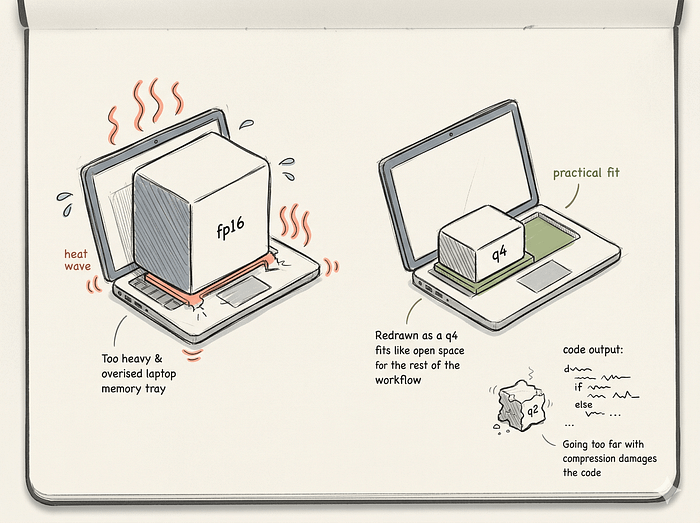
Models are originally trained using 16-bit floating point numbers. A 7-billion parameter model in 16-bit precision takes about 14 gigabytes of RAM just to load. Most laptops cannot handle that. Quantization compresses these weights into smaller formats like 8-bit or 4-bit integers.
You will see tags like Q4_K_M or Q8_0 on model files. A Q4 model compresses the weights to 4 bits. This cuts the memory requirement in half or more. The Q4_K_M version of a 7B model only needs about 4.5 gigabytes of RAM.
The tradeoff is a slight loss in reasoning capability. For coding tasks, Q4 is generally the minimum acceptable quality. If you drop down to Q2 or Q3 to force a massive model onto a small laptop, the model will forget basic syntax and hallucinate variables. I always recommend running a smaller parameter model at Q8 rather than a bigger model at Q2.
The 2026 Contenders
The open-weight model ecosystem moves incredibly fast. We are looking at the specific model families that actually matter for developers right now.
Qwen3-Coder-Next is the headline local coding model right now. Released by Alibaba in February 2026, it is an 80B Mixture-of-Experts model but it only uses about 3 billion of them for each token it generates. That sparsity is what makes it interesting locally — it scores 58.7% on SWE-bench Verified (close to Claude Sonnet 4.6 at 62.4%). It has a 256K context window and was trained agentically, so it handles multi-step tool use as well. You need roughly 45 GB of memory across your RAM and GPU to run a 4-bit version.
Qwen 3.5–27B and Qwen 3.6–27B are the standard choices if you have a single decent GPU. The 3.6 release scores high enough on real coding benchmarks to compete with paid cloud models, and at 4-bit, it fits in about 16.5 GB of VRAM. That leaves a 24 GB card like an RTX 4090 with plenty of headroom for a long conversation. For most developers on a single discrete GPU, this is the sweet spot in May 2026.
Gemma 4 is Google's April 2026 release and the biggest reason to revisit your setup if you have not looked in a while. It comes in four sizes, from tiny on-device models to a 31B dense version, and it ships under the permissive Apache 2.0 license. The small variants are the new default for laptops and phones. The mid-size Mixture-of-Experts version is currently the fastest local coding model by raw output speed.
Devstral 2 and Devstral Small 2 are Mistral's coding family from December 2025. Devstral Small 2 at 24 billion parameters is the laptop-friendly one. The bigger Devstral 2 holds its own against models several times its size. As of April 2026, Mistral has rolled most of this work into Mistral Medium 3.5, a single 128B model that merges their coding, reasoning, and multimodal capabilities together. Medium 3.5 has already replaced Devstral 2 as the default in their Vibe CLI, so if you are starting fresh on a workstation, it is the one to pull.
DeepSeek V3.2 is still a decent choice for reasoning-heavy work. It was the first open model to unfold its thinking process directly into tool use, and the Speciale variant holds its own against Gemini 3.0 Pro on reasoning benchmarks.
Codestral 25.12 is still the right answer for pure autocomplete. It is small enough to run comfortably on a 16 GB GPU and fast enough that you will not notice it thinking. It is not the model you want for a deep chat about your architecture, but for the suggestion that appears while you are typing, nothing beats it.
Agentic Tool Calling Locally
Local models in 2026 support native tool calling. The model can output structured JSON that your runtime intercepts to execute local Python functions.
from ollama import chat

def list_files(directory: str) -> str:
    """List files in a directory."""
    from pathlib import Path
    files = [f.name for f in Path(directory).iterdir() if f.is_file()]
    return "\n".join(files) if files else "No files found."

def read_file(path: str) -> str:
    """Read the contents of a file."""
    from pathlib import Path
    return Path(path).read_text()

available_functions = {
    "list_files": list_files,
    "read_file": read_file,
}

messages = [
    {"role": "user", "content": "What Python files are in ./src and what does main.py contain?"}
]

# Pass functions directly — the SDK infers the tool schema
response = chat(
    model="qwen3-coder:30b",
    messages=messages,
    tools=available_functions.values(),
)

# Execute any tool calls the model made
messages.append(response.message)

if response.message.tool_calls:
    for call in response.message.tool_calls:
        fn = available_functions[call.function.name]
        result = fn(**call.function.arguments)
        messages.append({
            "role": "tool",
            "tool_name": call.function.name,
            "content": result,
        })

    # Let the model synthesize the tool results
    final = chat(
        model="qwen3-coder:30b",
        messages=messages,
        tools=available_functions.values(),
    )
    print(final.message.content)
This snippet shows how local agentic coding works. The model decides it needs to see the file system. It calls the list function. Your machine runs the code and feeds the text back to the model. The model then decides to read a specific file. This entire loop happens on your local hardware without a single network request.
Hardware Realities and Memory Limits
You cannot pick a model based on a leaderboard. You have to pick a model based on your silicon. We need to look at how memory actually works during text generation.
When a model generates code, it has to store the context of the conversation in memory. This is called the Key-Value cache. Every single token you feed into the prompt takes up physical RAM. If you load a 32-billion parameter model and give it a big context window to read your repository, the model weights might take 20 GB of RAM. The KV cache will consume another big chunk just to hold that context.
If your machine runs out of unified memory, it will swap to the hard drive. Your generation speed will immediately drop from 30 tokens a second to 1 token a second.
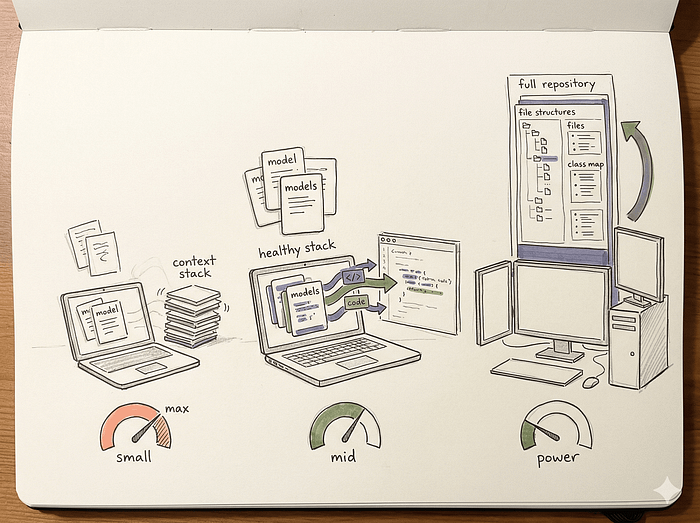
We can break hardware into three practical tiers.
The small machine tier includes laptops with 16 GB of unified memory or standard desktops without a strong discrete GPU. You have very strict memory limits here. The operating system needs some RAM. The editor and browser need some RAM. You only have about 8 GB left for AI. Local execution is good for basic autocomplete and light coding chat on these machines. You should exclusively run small coder models like Gemma 4 E2B or E4B, or Qwen 3.6 9B
The mid-range developer machine includes 32 GB or 64 GB MacBooks and PCs with a 24 GB VRAM GPU like the RTX 4090. This is the sweet spot for local AI. You have enough memory to hold larger weights and a decent KV cache. Local is very good for stronger coding chat, test generation, and file-level edits here. You can run the Qwen 3.6–27B model at Q4_K_M and get near-commercial logic capabilities with very acceptable latency.
The power-user tier includes Mac Studios with 128 GB of unified memory or multi-GPU desktop rigs. You are no longer severely constrained by RAM. Local becomes realistic for long-context coding chat, deep code review, and heavy agentic loops on this hardware. You can load 70B class models or run Qwen3-Coder-Next with a larger context window. You can feed entire codebases into the prompt and ask complex architectural questions.
Setting Up The Editor Harness
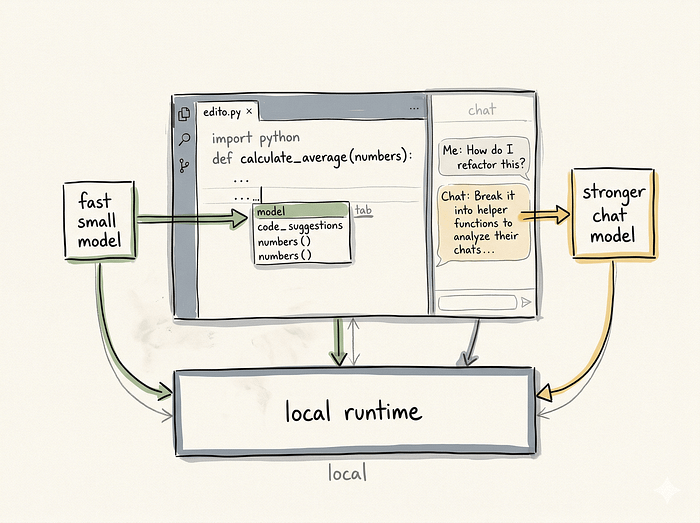
A great model is useless if the interface is terrible. The editor harness is the bridge between the runtime and your code. Tools like Continue attach directly to VS Code or JetBrains. They read your open files, format the prompt, send it to the local runtime, and stream the response back into your text editor.
Setting this up correctly is where most people fail. You have to configure two separate models in your continue.json file. You need one model for chat and a different model for tab-autocomplete.
Here is what a proper configuration looks like for a mid-range machine using Ollama.
{
  "models": [
    {
      "title": "Local Chat (Qwen 30b)",
      "provider": "ollama",
      "model": "qwen3-coder:30b",
      "apiBase": "http://localhost:11434"
    }
  ],
  "tabAutocompleteModel": {
    "title": "Local Autocomplete",
    "provider": "ollama",
    "model": "codestral:latest",
    "apiBase": "http://localhost:11434"
  },
  "tabAutocompleteOptions": {
    "useCopyBuffer": false,
    "maxPromptTokens": 1024,
    "prefixPercentage": 0.5
  }
}
We use the 30B model for the chat sidebar because it has better reasoning. We use codestral for tab-autocomplete because it is incredibly fast. We also restrict the maxPromptTokens for autocomplete to keep the latency as low as possible. If you try to use a 27B or a 30B model for autocomplete on a standard laptop, your editor will feel sluggish and unresponsive.
Latency Benchmarking
Technically runnable is never the same thing as pleasant to use daily. You need to benchmark your specific hardware to see if a model is actually viable for your workflow.
import time
from ollama import chat

PROMPT = "Write a Python class that implements a thread-safe LRU cache."

start = time.perf_counter()
token_count = 0

stream = chat(
    model="qwen3-coder:30b",
    messages=[{"role": "user", "content": PROMPT}],
    stream=True,
)

first_token_time = None

for chunk in stream:
    content = chunk["message"]["content"]
    if content:
        if first_token_time is None:
            first_token_time = time.perf_counter()
        token_count += 1
        print(content, end="", flush=True)

elapsed = time.perf_counter() - start
ttft = (first_token_time - start) if first_token_time else 0

print(f"\n\n--- Benchmark ---")
print(f"Time to first token : {ttft:.2f}s")
print(f"Total tokens         : {token_count}")
print(f"Total time           : {elapsed:.2f}s")
print(f"Tokens/sec           : {token_count / elapsed:.1f}")
Run this script on your machine. If your tokens per second drops below 15 for a chat model, you need to use a smaller model or a heavier quantization. Latency will kill your focus faster than a slightly wrong answer will. For autocomplete, you generally want to see over 40 tokens per second to make it feel natural.
Decision Matrix
Use this matrix to settle arguments about what to run. The right answer depends entirely on the hardware you actually own.

The Final Checklist
Before you download another GGUF file, run through this quick check.
What is your primary goal today? If you want instant code completions as you type, pick Codestral 25.12 or one of the small Gemma 4 variants and point your editor's autocomplete at it. If you want a chat assistant to explain errors and edit files, pick Qwen 3.6–27B or Qwen3-Coder-Next depending on how much memory you have.
Check your hardware reality. If you have 16 GB of RAM, stick to Gemma 4 E2B/E4B or Qwen 3.6 9B. If you have 32–64 GB or a 24 GB GPU, you can comfortably run Qwen 3.6–27B at 4-bit. Past 64 GB you can start loading Qwen3-Coder-Next or the Devstral family.
Test the latency. Run the benchmark script. If the model is too slow, delete the file and drop down a size. The goal is not to run the biggest model possible. The goal is to build a development environment that actually makes you faster. Stop staring at benchmark scores, pull a practical model that fits your RAM, and get back to writing code.
If this helped you, consider clapping 👏 so others can find it too.
Continue Reading
Claude Code vs Cursor vs Devin vs Copilot in 2026: The Comparison Everyone Is Still Getting Wrong — Compare coding assistants before choosing your local development workflow.
Building a Multi-Agent System That Turns One Sentence Into a $500 Online Course — Extend local models into practical multi-agent automation systems.
How I Would Become an AI Engineer in 2026 If I Had to Start Over — Build a broader AI engineering roadmap before you get started.